Brutalism and Pencil Shaders
A shape suggested by pencil marks. An interactive study of gesture, selective detail, and graphite.
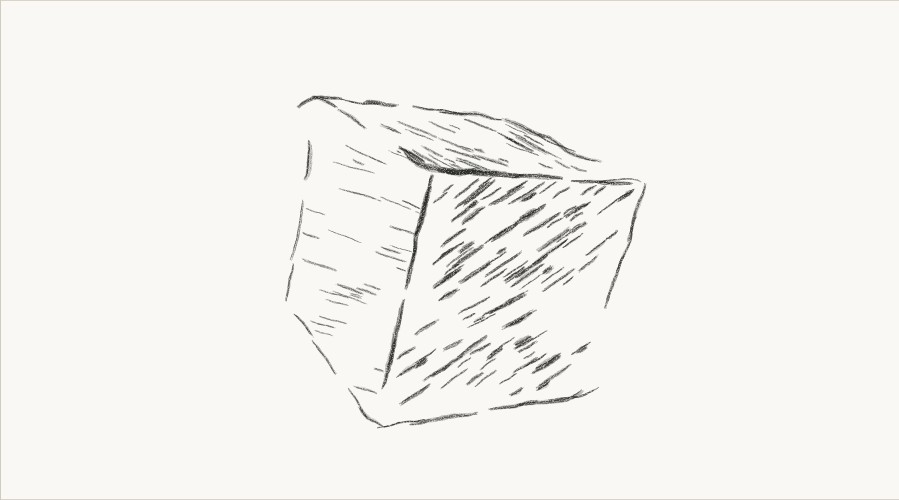 Drag to turn · or use arrow keys
 One shape, different sensations. The mood labels are prompts for looking, not measured emotional effects.
Let the marks suggest the building
New study — 18 October 2026.
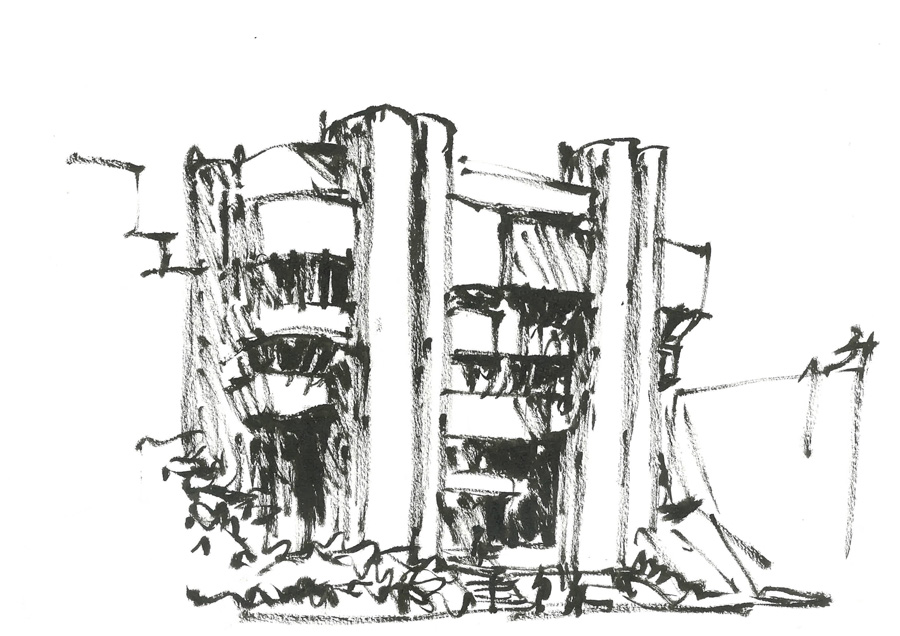
The building in the original reference below is compelling because of what the drawing chooses to notice. Dark strokes carry the weight of a floor or a column. Other edges trail away, miss their meeting point, or disappear into the paper. There is no obligation to give every surface the same amount of detail, or to obey perspective perfectly.
My first cube study treated drawing too much like a material applied to a solid object. Crosshatching and soft graphite were useful textures, but the fully described, precisely bounded faces still felt like a rendered cube. This version starts with Drawn marks: the visible image consists of finite pencil strokes, with the cube supplying an invisible guide.
Small drawing agents sense edges and tone ahead of them, steer their heading, and leave uneven trails. Their ink discourages other agents from crowding the same place. The contour strokes have different lengths and weights, may run beyond a boundary, and leave some of the construction unfinished. Selective detail concentrates attention near the nearest structural corner instead of distributing marks uniformly. The face guide is never painted into the drawing.
The contours and the shading need not obey the same rules. Letting the shading agents chase edges made some marks look like hairs attached to the cube. Face shading now compares three experiments, with the contour drawing held constant:
- Planar strokes — the new default. Short, gently bowed strokes share a direction within each patch of a face. They do not seek edges, and stop before their full width reaches a boundary.
- Contained agents — keep the earlier steering behavior, but give each shading stroke an owning face. Stop it before its graphite footprint crosses a crease; omit marks that have too little room.
- Loose agents (previous) — retain the earlier behavior, including wandering across faces, for comparison.
Pause the rotation and switch between them. Does containing the old marks solve the problem, or does the surface need its own rhythm? The unfinished contour can remain expressive without every shading stroke trying to become an outline.
Turn the cube with a finger or a mouse. Pause it, then change the pressure, stroke wander, or selective detail. How few marks are needed before the form stops reading as a cube? Which edge needs weight, and which can disappear? Redraw at 8 fps tries new sets of marks; leave it off to examine a settled drawing.
The earlier Crosshatch and Soft graphite treatments remain as comparisons. Graphite + hatch combines their soft underdrawing and intersecting shadow marks. These are still surface-based studies. The aim of the new agent drawing is different: to find the character of a form through the choices made by its strokes.
What is worth borrowing now?
Research notes, checked in October 2026. “State of the art” is not a single look here: a convincing still drawing, editable strokes, and a stable interactive scene are different goals.
- Keep marks coherent. Praun, Hoppe, Webb, and Finkelstein’s Real-time Hatching (2001) remains a useful foundation: tonal art maps organize strokes across brightness and scale. The surface-based comparisons anchor their marks to each face. The new agent drawing raises a harder question: how should individual strokes survive a changing view?
- Separate outline from tone. Maya Nedeljkovich’s pencil effect (2022) uses image and normal information for sketchy post-processing. Maxime Heckel’s Mœbius study (2024) explores displaced outlines and patterned shadows. Both are useful references for treating the silhouette and the shading as distinct artistic decisions.
- Let strokes have their own structure. Screen-Space Hatch Lines, an add-on for Blender 4.4+, constructs Grease Pencil strokes using streamlines, stippling, and scribbling. That is a compelling direction for returning to the original moving-pencil experiment: give the marks a path and spacing, rather than only adding noise to a finished image.
- Make the material adjustable. Jan Bock’s 2026 impossible-object study combines graphite tone, hatching, stippling, grain, and live controls. The useful lesson for this page is the working method: compare materials on the same geometry while changing one parameter at a time.
- Keep artistic control in view. Kapil Dev’s 2025 discussion of classical and neural stroke-based rendering proposes combining explicit rules with learned refinement. It is a research direction, not evidence of a best real-time pencil shader. For this first browser study, direct control over marks is the priority.
Returning to the pencils
The original HLSL experiment below is the starting point for the agent drawing. The contour and agent-shading modes use a low-resolution guide of the cube’s faces and edges, three forward sensors per pencil, finite trajectories, and a deposited-ink field. Planar shading instead constructs short sweeps within each face, without edge-seeking. Both draw their paths as broken graphite filaments on a 2D canvas. Selective sampling, unequal pressure, and loose construction are artistic decisions layered onto those drawing rules.
It is a bounded reinterpretation, not a port of the full compute simulation. For each changed view, the agents replay a seeded drawing process; a paused view stays still. It does not yet carry persistent strokes from one viewpoint to the next or simulate physical graphite deposition. That leaves a useful next question: which marks should move with the structure, and which should be erased and reconsidered?
The comparison materials use the earlier WebGL renderer. No trained models or downloaded stroke textures are involved. The question is not only how closely a result resembles graphite. It is what kind of place those marks make us feel we are entering.
The original experiment · 2023
Walking through a pencil drawing of a brutalist building
I would like to create a walking simulation of what it would be like to explore a pencil drawing of a brutalist building. Below is an example of the style I am aiming for.
As the player walks through the environment, the style of the pencil strokes and shading should change to reflect the mood. Slow straight strokes for calm and thick chaotic strokes for danger. Below a handful of examples to use as reference.
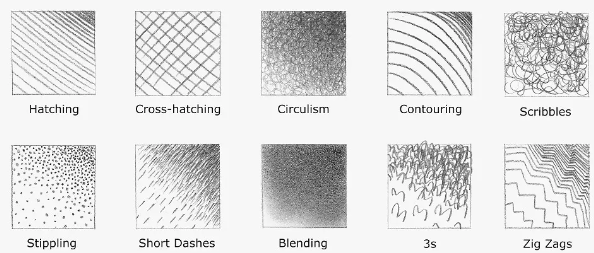
How do pencil strokes look as a shader?
We take inspiration from slime mold simulations and use compute shaders to define the update rules for the position and velocity of each pencil. In our case, instead of having the pencil react to each other, as the slime mold does, the pencils will be a post-processing effect in a rendering pipeline.
The shader we write will have to make a pencil:
- Follow edges when it can
- Moves in one direction along planes
- Changes thickness according to lighting/depth
- Creates a trail of finite length
The HLSL code for these rules is available in this repository
The next step proposed in 2023
There is too much going on with all the moving pencils. More frame-to-frame consistency is required in order to make a walking simulation playable. This can be done by running the compute shaders for multiple passes in the background and only rendering images once the pencil simulation has reached “steady state”. This will give the walking simulation a stop-motion feeling like with hand-drawn animation.